This is an editorial of the site written by Trevor Moseley (David Moseley’s son).
David could not sit still for more than 5 minutes, he had to be doing something. Back at the tender age of 21 (1957), he had just got married, started his new career as a teacher, bought a brand new bungalow in Odiham and in 1958, had his first child (Gina). But with all that lot going on, he must have been bored! So, he bought himself a Cine camera with all the extra equipment and started using it to document his family’s life.
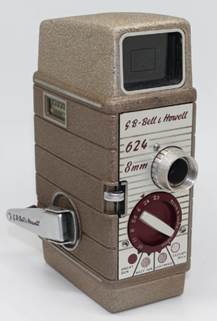
David’s was grey, but I think very similar, it worked by clockwork (winder on left in photo). David’s also had a leather case with carrying strap. It required special film from Kodak which he had to buy in advance. The film had to be carefully loaded in a dark place. Each film took 15 minutes of video without sound. The film then needed to be carefully unloaded in the dark, sealed back in it’s container and sent off for developing, again by post. It was always exciting when a developed small reel came back, he would then get out the projector and we would have a review of it shone on a suitable wall. Later David would use special glue and a special splice gadget to join the smaller films together into larger, long films on new large reels in metal tins. He did this solidly from 1960 until around 1969, he then carried on intermittently up until 1987. Rarely, he would have shows for visitors on a special large unrollable screen. Inside each tin, with the film, there was a list of David’s hand written notes.
Around 2003, David said that he wanted to convert them to digital, but it was very expensive and there was a lot of films, could I do something. I cheated, bought a cheap video camera (£250) then setup the cine projector and video camera pointing at the same wall. I did this with all the films, ended up with high quality videos of fairly low quality Cine film, due to having no sound, I added a sound track of all the UK Top 20 sounds at the time of the original cine. David was happy with the result, there are 14 DVDs known as CineVid as a result. I did a few copies, but not that much interest. Technology moved on, I converted them all to .mp4 and they could then all fit onto a mobile phone, I had them on mine, David had them on his. David told me that he spent may hours in different hotel rooms around the world enjoying the CineVids.
Around 2018, I created a web site in a Raspberry Pi in my study, set it up on line as http://moseley.hopto.org/ , just the CineVid.
At that time it was slow ADSL broadband. Since then my broadband has upgraded, now much more useable.
I visited David in CoVid isolation, he very carefully told me that he wanted me to take his phone and computers and put all his photos on-line after he died, at the time, I thought he was being daft.
So, now I have started to do what he asked. I bought a 1GB portable drive and copied all his photos from phone and 2 laptops to that drive. I then copied them from portable drive to my PC hard drive.
I have sorted all the 3 sets of photos into 1 large directory, keeping David’s directory names. I haven’t deleted odd or out of focus shots, they are all as David took them.
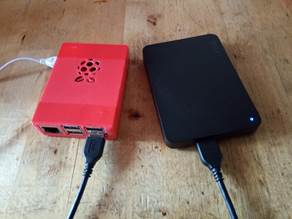
I modified http://moseley.hopto.org/ to have a David Moseley start screen. I added the portable drive to the Raspberry Pi, re-formatted for Linux.
The CineVids all remain under the top level ‘CineVid’ link. Each CineVid may be downloaded to your device by right clicking a mouse (or equivalent) and choosing save.
All Davids photos can be found under the top level ‘Gallery’ link. I have run scripts on them to make them more viewable, it produces a web page full of 10% size thumb nails. Clicking on a thumbnail will show the full sized photo. Each photo may be downloaded by right clicking a mouse (or equivalent) and choosing save. The thumbnail view page also has the option at the bottom to download all the photos for the page as a zip file.
David also did quite a few documents in MS Works on his laptop. David’s documents (and this file) can be found under the top level ‘Documents’ link. Currently I have converted all his docs to MS Word format. I have modified 2 of his life documents by adding some of his photos and used Word to save as HTML, that is what you can see. I will be modifying more.
Links I used:
https://askubuntu.com/questions/1220778/how-can-web-server-access-external-hdd
http://unixetc.co.uk/2014/08/23/simple-picture-gallery-on-raspberry-pi/
Later (soon):
I will be modifying more documents and adding them.
The Gallery currently contains all his digital photos, in some cases, he used his phone to digitize old photos. I have already done this with 1 of his pre-digital albums, I will be adding others as I fetch and digitize them.